Appearance
弹窗组件
引入
jq插件,务必在jq环境下使用
js
  <link rel="stylesheet" href="./CSC_Dialog/CSC_dialog.css" />
  <script src="./CSC_Dialog/CSC_dialog.js"></script>
代码演示
js
$.cscModal({
  showTitle: true,
  title: '测试',
  message: '测试测试测试测试测试测试测试测试',
  showCancelButton: true,
  handelConfirm: () => {
    console.log('确认')
  },
  handelCancel: () => {
    console.log('取消')
  }
})
效果图
[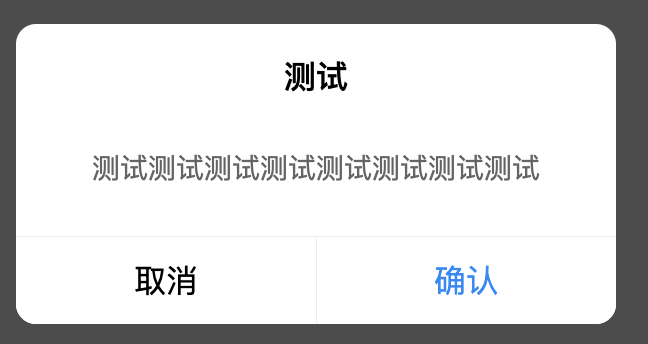 ]
]
API
Props
| 参数 | 说明 | 类型 | 默认值 |
|---|---|---|---|
| showTitle | 是否显示标题 | boolean | true |
| title | 标题文案 | string | 标题 |
| width | 弹框的宽度 | string | 80% |
| message | 文本内容 | string | - |
| messageAlign | 文本内容对齐方式,可选值为left,right | string | center |
| showConfirmButton | 是否展示确认按钮 | boolean | true |
| showCancelButton | 是否展示取消按钮 | boolean | false |
| confirmButtonText | 确认按钮文案 | string | false |
| confirmButtonColor | 确认按钮文本颜色 | string | #1989fa |
| cancelButtonText | 取消按钮文案 | string | 取消 |
| cancelButtonColor | 取消按钮文本颜色 | string | #000 |
Events
| 事件 | 说明 | 回调参数 |
|---|---|---|
| handelConfirm | 点击确认按钮时触发 | -- |
| handelCancel | 点击取消按钮时触发 | -- |